eslint・prettierを含む基本設定

Nexus用 Snippet を追加する
自作で利用中のスニペットです。
これを参考に自身のスニペットに変更するのも良いかもしれません!
macOSでは ~/Library/Application\ Support/Code/User/snippets/nexus-graphql-sdl.json.code-snippets ファイルを作成します。
try🐶everything myproject$ cat ~/Library/Application\ Support/Code/User/snippets/nexus-graphql-sdl.json.code-snippets
...
{
  "Jace Nexus objectType": {
    "scope": "javascript,typescript",
    "prefix": "nexo",
    "body": [
      "import { objectType } from \"nexus\";",
      "\nexport const ${1} = objectType({",
      "\tname: \"${1}\",",
      "\tdefinition(t) {",
      "\t\tt.nonNull.id(\"id\")",
      "\t}",
      "});"
    ],
    "description": "Jace Nexus objectType"
  },
  "Jace Nexus extendType": {
    "scope": "javascript,typescript",
    "prefix": "nexex",
    "body": [
      "import { extendType, intArg } from \"nexus\";",
      "\nexport const ${1} = extendType({",
      "\ttype: \"Query\",",
      "\tdefinition: t => {",
      "\t\tt.field(\"userById\", {",
      "\t\t\ttype: \"User\",",
      "\t\t\targs: { id: intArg(\"id of the user\") },",
      "\t\t\tresolve: (root, args, ctx) => ctx.user.getById(args.id),",
      "\t\t})",
      "\t},",
      "})"
    ],
    "description": "Jace Nexus extendType"
  },
  "Jace Nexus subscriptionType": {
    "scope": "javascript,typescript",
    "prefix": "nexsb",
    "body": [
      "import { subscriptionType } from \"nexus\";",
      "\nexport const ${1} = subscriptionType({",
      "\tname: \"${1}\",",
      "\tdefinition(t) {",
      "\t\tt.nonNull.id(\"id\")",
      "\t}",
      "});"
    ],
    "description": "Jace Nexus subscriptionType"
  },
  "Jace Nexus unionType": {
    "scope": "javascript,typescript",
    "prefix": "nexun",
    "body": [
      "import { unionType } from \"nexus\";",
      "\nexport const ${1} = unionType({",
      "\tname: \"${1}\",",
      "\tdescription:'',",
      "\tdefinition(t) {",
      "\t\tt.nonNull.id(\"id\")",
      "\t},",
      "\tresolveType: (item)=>item.name",
      "});"
    ],
    "description": "Jace Nexus unionType"
  },

  "Jace Nexus interfaceType": {
    "scope": "javascript,typescript",
    "prefix": "nexin",
    "body": [
      "import { interfaceType } from \"nexus\";",
      "\nconst Node = interfaceType({",
      "\tname: \"Node\",",
      "\tdefinition(t) {",
      "\t\tt.id('id', { description: 'GUID for a resource' })",
      "\t},",
      "});"
    ],
    "description": "Jace Nexus interfaceType"
  },

  "Jace Nexus enumType": {
    "scope": "javascript,typescript",
    "prefix": "nexen",
    "body": [
      "import { enumType } from \"nexus\";",
      "\nexport const ${1} = enumType({",
      "\tname: \"${1}\",",
      "\tmembers: [],",
      "\tdescription: \"\"",
      "});"
    ],
    "description": "Jace Nexus enumType"
  },

  "Jace Nexus inputObjectType": {
    "scope": "javascript,typescript",
    "prefix": "nexip",
    "body": [
      "import { inputObjectType } from \"nexus\";",
      "\nexport const ${1} = inputObjectType({",
      "\tname: \"${1}\",",
      "\tdefinition(t) {",
      "\t\tt.nonNull.string(\"key\")",
      "\t\tt.int(\"answer\")",
      "\t},",
      "});"
    ],
    "description": "Jace Nexus inputObjectType"
  },
  "Jace Nexus typeFiled": {
    "scope": "javascript,typescript",
    "prefix": "nextf",
    "body": "t.field(\"${1}\",{type:\"${1}\"})",
    "description": "Jace Nexus type field"
  }
}
try🐶everything myproject$
作成したら、
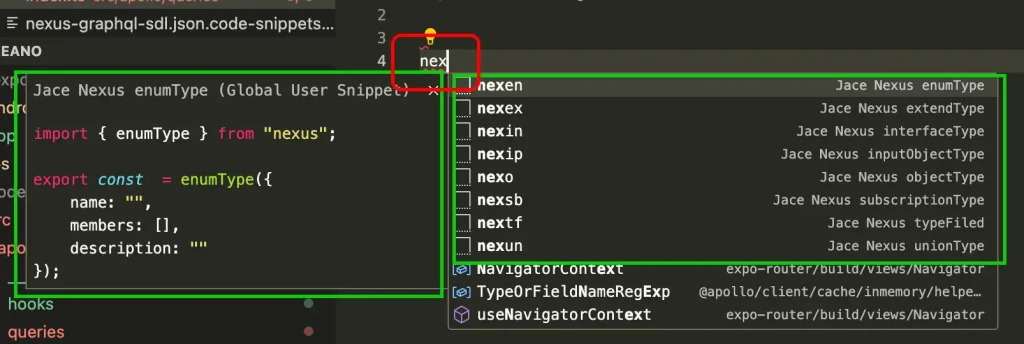
VSCode で 任意のファイル ( *.ts ) を開き nex と入力すると関連スニペットリスト ( 右側 )・それぞれのプレビュー ( 左側 ) が表示されます。
VSCode 拡張 ( GraphQL / Prisma )を追加する
- Prisma (prisma.prisma): https://marketplace.visualstudio.com/items?itemName=Prisma.prisma
- GraphQL (graphql.vscode-graphql): https://marketplace.visualstudio.com/items?itemName=GraphQL.vscode-graphql
> graphqlrc.yml 設定: https://marketplace.visualstudio.com/items?itemName=GraphQL.vscode-graphql
try🐶everything myproject$ touch .graphqlrc.yml
try🐶everything myproject$ cat .graphqlrc.yml
schema: "schema.graphql"
documents: "src/**/*.{graphql,js,ts,jsx,tsx}"
try🐶everything myproject$
settings.json に下記のように追加します。
try🐶everything myproject$ cat  ~/Library/Application\ Support/Code/User/settings.json
{
  ...
  "editor.formatOnSave": true,
  ...
  "[graphql]": {
    "editor.defaultFormatter": "esbenp.prettier-vscode"
  },
  "[prisma]": {
    "editor.defaultFormatter": "Prisma.prisma"
  }
}
ESLint の設定ファイルが変わりました(2026 年 7 月 追記)
スニペットの登録、GraphQL と Prisma の拡張機能、.graphqlrc.yml、settings.json のフォーマッタ指定——このあたりは今も同じです。
ただしESLint の設定ファイルの形式が根本的に変わりました。この記事を書いたあとの変更なので、補足しておきます。
Flat Config が既定になりました
2024 年 4 月の ESLint v9 から、eslint.config.js(Flat Config)が既定の設定形式になりました。従来の .eslintrc.* は非推奨です。
移行を先送りしにくい事情が 2 つあります。
- ESLint v8 は 2024 年 10 月 5 日にサポートが終了しました。セキュリティ上の問題が見つかっても修正されません
.eslintrcは ESLint v10 で完全に削除される予定です
つまり「v8 のまま留まる」という選択肢も、実質なくなっています。
書き方の違い
文字列で指定していた部分が、モジュールを import して配列で並べる形になります。
// 従来(.eslintrc.js)
module.exports = {
  extends: ["eslint:recommended"],
  rules: {
    "no-unused-vars": "warn",
  },
};

// Flat Config(eslint.config.js)
import js from "@eslint/js";

export default [
  js.configs.recommended,
  {
    files: ["src/**/*.ts"],
    rules: {
      "no-unused-vars": "warn",
    },
  },
];従来のようにディレクトリ階層で設定が引き継がれる(カスケード)仕組みがなくなり、どのファイルにどの設定が当たるかを files で明示する形になりました。慣れると読みやすい構造です。
移行は自動化できます
手で書き直す必要はありません。公式の移行ツールがあります。
npx @eslint/migrate-config .eslintrc.json既存の設定を読み込んで eslint.config.js を生成し、追加で必要なパッケージも教えてくれます。
ただし完全ではありません。設定ファイルの中に条件分岐などのロジックを書いていると、その部分は引き継がれません。生成後に必ず目視で確認してください。
つまずきやすい点
プラグインの対応状況を先に確認してください。ESLint 本体を上げても、使っているプラグインが Flat Config に対応していないと動きません。移行の作業時間の大半はここに費やされます。
どうしても間に合わない場合、環境変数 ESLINT_USE_FLAT_CONFIG を false にすれば従来形式を使えます。ただしあくまで一時しのぎです。v10 では効かなくなります。
なお、この記事の中心であるスニペットや拡張機能の設定は、ESLint のバージョンとは無関係です。そのままお使いいただけます。
※ 本節は 2026 年 7 月時点の公開情報に基づく整理であり、当方の環境での再検証は行っていません。

コメント