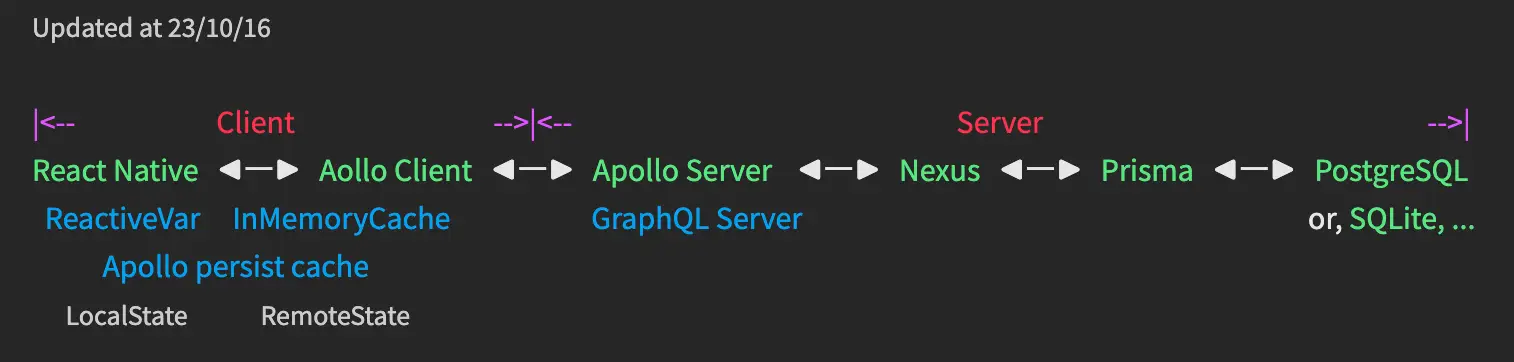
この記事は、⬇︎の記事の続きです。
Nexus タイプを作成する
以前の記事で PostgreSQL Table を Prisma タイプ ( prisma/schema.prisma ) で作成しました。
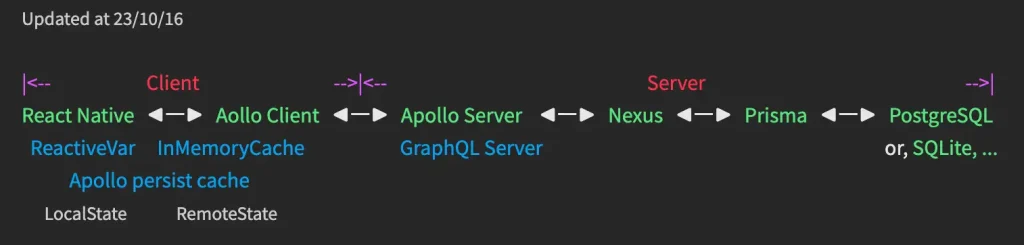
次は、Prismaタイプ を Apollo Server 即ち、Graphql タイプ に変換します。
Nexus タイプ を作成し prisma migrate コマンドを実行すれば Graphql タイプ に変換されます!
src/graphql/Post.ts を作成します。
DateTime 型を実装する必要があるため下記の記事で続きます。
src/graphql/Profile.ts を作成します。
// src/graphql/Profile.ts

import { objectType, extendType, nonNull, stringArg } from "nexus";

/*
  *** Prisma type ***
  model Profile {
    id     Int     @id @default(autoincrement())
    bio    String?
    user   User    @relation(fields: [userId], references: [id])
    userId Int     @unique
  }
*/

export const Profile = objectType({
  name: "Profile",
  definition(t) {
    t.nonNull.int("id");
    t.string("bio");
    t.field("user", {
      type: "User",
      resolve: (parent, _, ctx) => {
        return ctx.prisma.user.findUnique({ where: { id: parent.id } }).user();
      },
    });
  },
});
src/graphql/User.ts を作成します。
// src/graphql/User.ts

import { objectType } from "nexus";

/*
  *** Prisma type ***
  model User {
    id      Int      @id @default(autoincrement())
    email   String   @unique
    name    String?
    posts   Post[]
    profile Profile?
  }
*/

export const User = objectType({
  name: "User",
  definition(t) {
    t.nonNull.int("id");
    t.nonNull.string("email");
    t.string("name");
    t.field("posts", {
      type: "Post",
      resolve: (parent, _, ctx) => {
        return ctx.prisma.post.findUnique({ where: { id: parent.id } }).post();
      },
    });
  },
});
まとめ
src/graphql/xxx.ts ファイルに GraphQL Type を作成して保存すると、保存たびに src/schema.ts で設定済みの output 先である src/generated/nexus-typegen.ts、src/generated/schema.graphql ファイルが書き換えられ、Apollo Server に同期されます。
src/generated ディレクトリーを削除するのはデバッグの一つの手段です。
※ Json 型の設定はこちら⬇︎⬇︎
コメント